Pattern Noise Cleaning (Step=1)
Relevant code
XDpiped.csh cleanir.py
Relevant options
1cleanir_sciflag: nfrq (f) [whether/how to run cleanir.py on the science target spectra]
2cleanir_stdflag: nfrq (f) [whether/how to run cleanir.py on the standard star spectra]
3cleanir_arcflag: nfrq (n) [whether/how to run cleanir.py on the arc spectra]
4cleanir_IRflag:  nfrq (n) [whether/how to run cleanir.py on the IR flat spectra]
5cleanir_QHflag:  nfrq (n) [whether/how to run cleanir.py on the QH flat spectra]
6cleanir_pinflag: nfrq (n) [whether/how to run cleanir.py on the pinhole flat spectra]
What it does
By default, the science target and standard star data are “cleaned” of
electronic pattern, with XDpiped.csh acting as a wrapper for the
cleanir.py script. The 2022-02-16 version the code is supplied as
part of the XDGNIRS package. The cleaning script can be run in several ways
using the options shown above. The default, “f”, means that subtraction of the
pattern is forced rather than only being applied if the code detects an
improvement in the rms after the cleaning. See this web page for more
information and an explanation of the “r” and “q” options: cleanir removing
electronic pattern.
The cleaned files are given the prefix “c” (e.g., cN20111204S0339.fits)
and are saved in the INTERMEDIATE subdirectory. Setting cleanir_flag=n
causes the code to skip the cleaning step altogether, but files with the
“c” prefix are still written (actually, symbolic links are created).
What to look for
The user is advised to inspect the cleaned data files visually. A
limitation of XDGNIRS is that it uses the same option on all the files
if a particular type (e.g., all the standard star files). If certain files
turn out to need special treatment; workarounds include (1) excluding
those files from the input file list, or (2) deleting the cleaned file,
running cleanir.py on it outside the pipeline, and restarting XDGNIRS
from Preparing the Data (Step=2).
Things to most likely go wrong
The cleaning script generally works well but occasionally gives odd results
that can affect the rest of the reduction unexpectedly. In Preparing the Data (Step=2),
image statistics are written into the PRODUCTS/XDGNIRS_Log.txt file. If
anomalous values are detected (for instance, if the flats have a very different
mean value before and after the cleaning), a warning is written into the
PRODUCTS/Checks_and_Warnings.txt file. If this happens, the user must
experiment with the cleanir options until satisfactory results are obtained.
Example: NGC 3031
figclean shows a file with electronic striping before
and after running the cleanir script. The weak pattern in the file
N20120305S0067 is removed effectively by the script. Low-level offsets
between the array quadrants are visible after the cleaning. It may be
possible to remove them by running XDGNIRS with cleanir_sciflag=fq, but
such minor offsets are unlikely to affect the final spectrum noticeably.
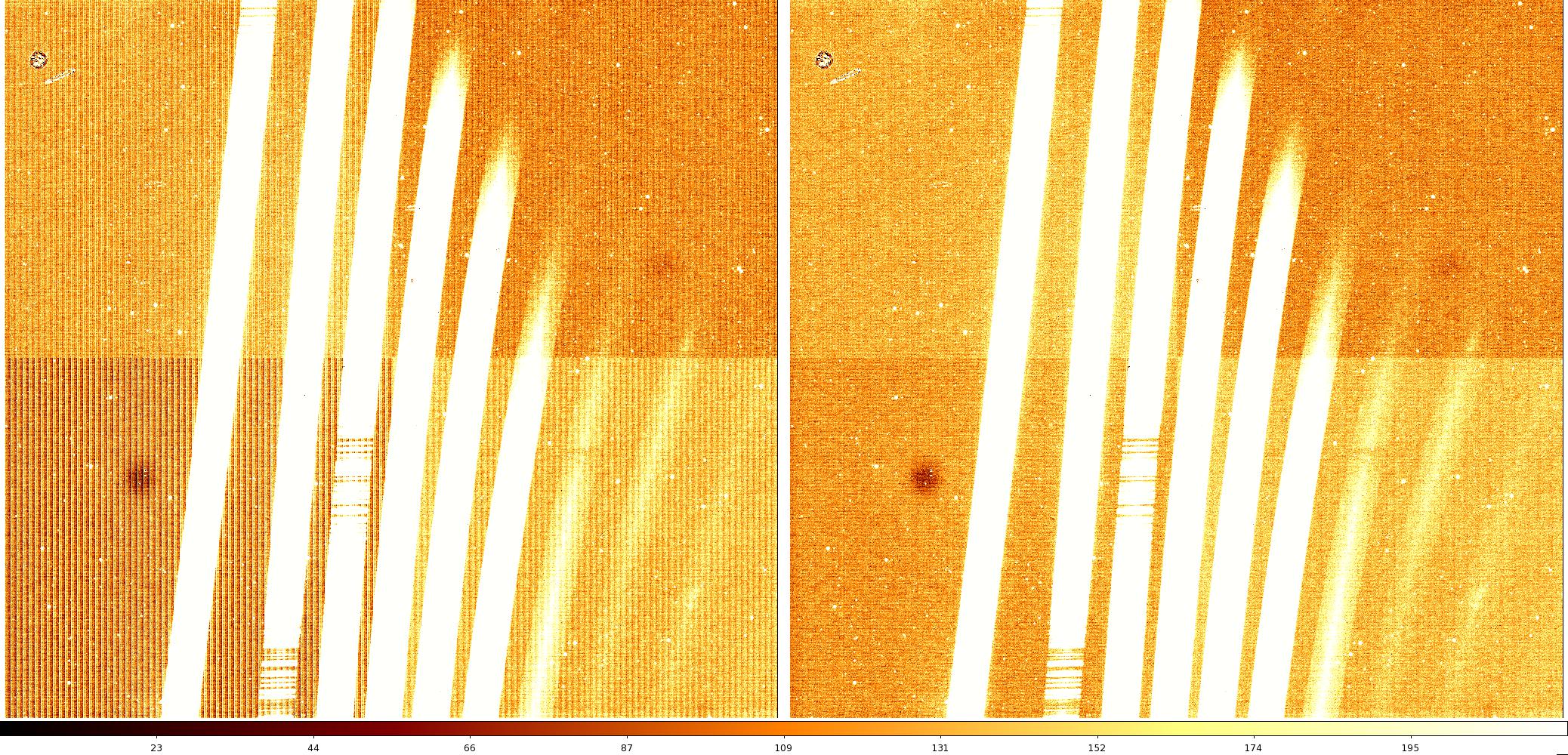
File N20120305S0067 (left) contains some fairly low-level electronic
striping, which the cleanir script effectively removes (right). The
data also show a couple of “tachyons” (bloblike artifacts that often
appear after GNIRS has been cooled to operating temperature), and
“radiation events”, cosmic ray-like hits resulting from radioactive
camera lens coatings. These lenses were replaced in mid-2012. Display
files N20120305S0067 and cN20120305S0067 with z1=-5 and z2=5 to
reproduce this figure and inspect the data.