Extracting the Spectra (Step=7)
Relevant code
XDpiped.csh ExtractSpectraXD.py
Relevant options
1use_apall:   yes/no (no) [use apall to do a weighted extraction?]
2nsext_inter: yes/no (no) [run nsextract interactively?]
3aperture:    1-40 (4) [extraction aperture (+/-)]
4extras:      yes/no (no) [extract full-slit spectrum and in steps along the slit?]
5columns:     1-40 (6) [width of each extraction step along the slit (pixels)]
What it does
Next, 1D spectra are extracted from each order. By default, an aperture
of \(\pm\)4 pixels (\(\pm\)0.6) is used; this can be changed
using the “aperture” parameter. The standard star and science target
spectra extracted in this way are given the prefix “v” (e.g.
vtarget_comb.fits).
The extraction is done using the nsextract task. As this stage has straightened
spectra, extracting a set of columns is the default. Alternatively, the code
can call apall for variance-weighted extraction (use_apall=yes). As intended,
this improves the S/N a little for fainter targets. However, it is not the
default option because we have seen it introduce artifacts into spectra of
bright, extended objects, making it less useful for hands-off reductions. Also,
no background subtraction is attempted when apall is called, given the short
slit and the difficulty of finding parameters that work reliably for a wide
range of objects.
To enable automated extractions of faint targets, XDGNIRS looks at the
aperture centers recorded by apall in the INTERMEDIATE/database files. It
assumes the standard star apertures were correctly centered. Next, it
calculates the expected positions of the science target apertures based on the
relative nod offsets for the science target and standard star. If the aperture
locations deviate from the expected positions by more than a few pixels,
XDGNIRS re-extracts the spectra forcing the apertures to be at the expected
locations. This is only done if nsext_inter=no, so as not to override apertures
defined interactively by the user. While these checks should help produce
reasonable quick-look spectra, science-quality reductions of faint targets will
probably require extracting them manually using the nsext_inter=yes option.
If extras=yes, spectra of the science target are also extracted in an
aperture of \(\pm\)23 pixels (the entire slit) and in steps along the
slit. These spectra have the prefix “a” and “s,” respectively (e.g.,
atarget_comb.fits, s1target_comb.fits, s2target_comb.fits; numbers
indicate the step along the slit starting from lower pixel numbers).The
full-slit extraction may fail if the target is not located near the center of
the slit and it is intended for extended objects in which the “B” beam was
nodded off the slit. These “extra” extractions have not been thoroughly tested
and should be used with caution.
What to look for
You might like to look at the extracted orders of the science target and
standard star (the vtarget_comb and vstandard_comb spectra). Depending
on the kind of target you observed, they should look something like the
examples on the GNIRS XD DR page.
Things to most likely go wrong
The full-slit and stepwise extractions have not been extensively tested.
If they appear to be causing problems, try extras=no.
Example: NGC 3031
The spectra extracted from extension 1/order 3 of the galaxy and standard star data are shown in Fig. 10. Further examples, including the remaining orders, can be found on the GNIRS XD DR page.
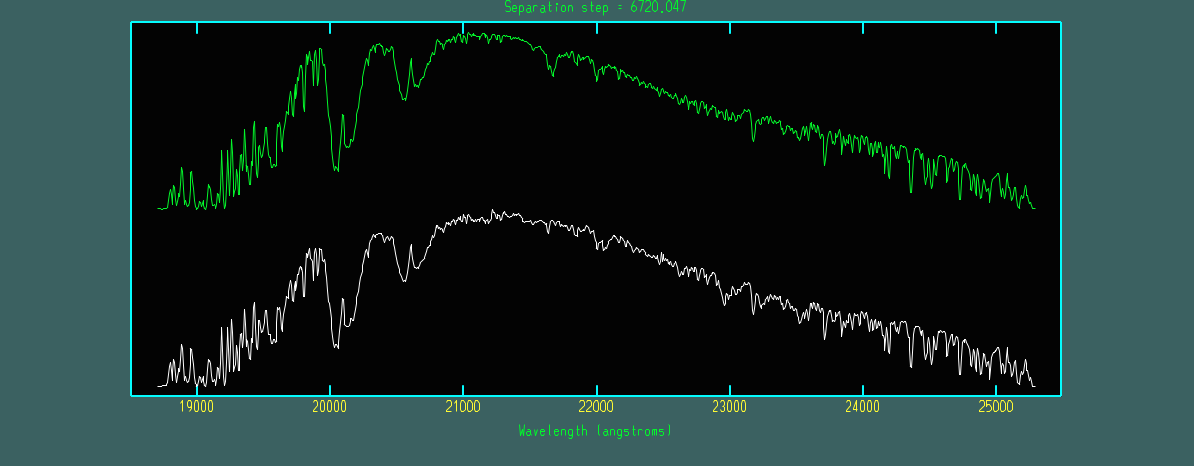
Fig. 10 Spectra extracted from extension 1/order3 of the standard star (vstandard_comb.fits, green) and galaxy (vtarget_comb.fits, white). Most of the features in the spectra are atmospheric absorption bands, although CO band heads appear to be present in the galaxy spectrum from about 2.3 \(\mu\)m.